KDT Unity 2주차~4주차 - 개인학습9
해당 내용의 전부는 학원에서 배우는 것이기 때문에 공개가 어렵습니다.
해당 내용의 자세한 강의가 필요하신 분들은 이곳에서 확인하시면 됩니다.
2023-11-16 TIL
알고리즘 문제
오늘의 알고리즘 문제 : 콜라츠 추측
1937년 Collatz란 사람에 의해 제기된 이 추측은, 주어진 수가 1이 될 때까지 다음 작업을 반복하면, 모든 수를 1로 만들 수 있다는 추측입니다. 작업은 다음과 같습니다.
단, 주어진 수가 1인 경우에는 0을, 작업을 500번 반복할 때까지 1이 되지 않는다면 –1을 반환해 주세요.
1
2
3
4
5
6
public class Solution {
    public int solution(int num) {
        int answer = 0;
        return answer;
    }
}

해결
제한만큼의 for문을 만들어줍니다.
그리고 해당 for문 안에 조건문을 넣어줍니다.
if (num == 1) return i; num이 1 일시 해당 반복횟수 리턴
else if (num % 2 == 0) num /= 2; 짝수일시 반으로 나누기
else if (num % 2 == 1) num = ((num * 3) + 1); 홀수 일시 3을 곱하고 1을 더하기
return -1; 500번 안에 안되어 for을 탈출시 -1 리턴
1
2
3
4
5
6
7
8
9
10
11
12
public class Solution {
    public int solution(int num) {
        for(int i = 0; i < 500; i++)
        {
            if (num == 1) return i;
            else if (num % 2 == 0) num /= 2;
            else if (num % 2 == 1) num = ((num * 3) + 1);
        }
        return -1;
    }
}
Unity New Input system으로 점프와 대쉬를 구현해보자!
어제는 이동을 구현했습니다
오늘는 대쉬와 점프를 구현해보겠습니다.
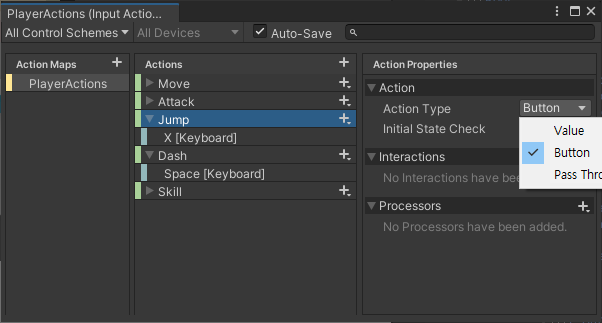
어제와 마찬가지로 New Input에서 추가를 먼저 해줍니다.
이번에는 그때와 다르게 Action Type은 Button으로 해줍니다.
그리고 스크립트를 작성해줍니다.
스크립트
PlayerController.cs
1
2
3
4
5
6
7
8
9
10
11
12
13
14
15
16
17
18
19
20
21
22
23
24
25
26
27
28
29
30
31
32
33
34
35
36
37
38
39
40
41
42
43
44
45
46
47
48
49
50
51
52
53
54
55
56
57
58
    void FixedUpdate()
    {
        Move();
    }

    public void OnMove(InputAction.CallbackContext context)
    {

        direction = context.ReadValue<Vector2>();
        if (direction.x != 0) animator.SetFloat("RunState", 0.5f);
        else animator.SetFloat("RunState", 0);

    }
    protected void Move()
    {
        direction.Normalize(); // 정규화
        if (isDash)
        {
            Dash();
            return;
        }
        player.playerBody2D.gravityScale = 3;
        transform.localScale = new Vector2(direction.x !=0 ? -direction.x : transform.localScale.x, 1);
        player.playerBody2D.velocity = new Vector2(direction.x * player.MoveSpeed, player.playerBody2D.velocity.y);
    }

    public void OnJump(InputAction.CallbackContext context)
    {
        if (context.performed && player.JumpCount > 0)
        {

            player.playerBody2D.velocity = new Vector2(player.playerBody2D.velocity.x, player.JumpForce);
            player.DownJumpLimit();
        }
    }

    public void OnDash(InputAction.CallbackContext context)
    {
        if (context.performed && !isDash && player.DashCount > 0)
        {
            isDash = true;
            Invoke("OffDash", player.DashTime);
            player.DownDashLimit();
        }
    }
    void Dash()
    {
        player.playerBody2D.gravityScale = 0;
        player.playerBody2D.velocity = new Vector2(player.DashSpeed * -transform.localScale.x, 0);
    }


    void OffDash()
    {
        isDash = false;
    }
Player.cs
1
2
3
4
5
6
7
8
9
10
11
12
13
14
15
16
17
18
19
20
21
22
23
24
25
26
27
28
29
30
31
32
33
34
35
36
37
38
39
40
41
42
43
44
45
46
47
48
49
50
51
    public float JumpForce { get { return jumpForce; } }
    public float JumpCount { get { return jumpCount; } }
    public float DashSpeed { get { return dashSpeed; } }
    public float DashCount { get { return dashCount; } }
    public float DashTime { get { return dashTime; } }
    public int DashLimit { get { return dashLimit; } set { dashLimit = value; } }

    bool dashCheck = false;

    [SerializeField] protected float jumpForce;
    [SerializeField] protected float jumpCount;
    [SerializeField] protected float dashSpeed;
    [SerializeField] protected float dashCount;
    [SerializeField] protected float dashTime;
    [SerializeField] protected int dashLimit;

    public void OnUpdateStat(float moveSpeed, float jumpForce, float jumpCount, float dashSpeed, float dashCount, int dashLimit, float dashTime)
    {
        this.moveSpeed = moveSpeed;
        this.jumpForce = jumpForce;
        this.jumpCount = jumpCount;
        this.dashSpeed = dashSpeed;
        this.dashCount = dashCount;
        this.dashLimit = dashLimit;
        this.dashTime = dashTime;
    }

    public void DownJumpLimit()
    {
        jumpCount--;
    }

    public void DownDashLimit()
    {
        dashCount--;
        if (dashCount != 0) Invoke("DashLimitZero", 0.5f);
        if(dashCount == 0) Invoke("ResetDashLimit", 2.0f);
    }
    void DashLimitZero()
    {
        if (dashCount != 0)
        {
            dashCount = 0;
            Invoke("ResetDashLimit", 1.5f);
        }
    }
    void ResetDashLimit()
    {
        dashCheck = false;
        dashCount = DashLimit;
    }
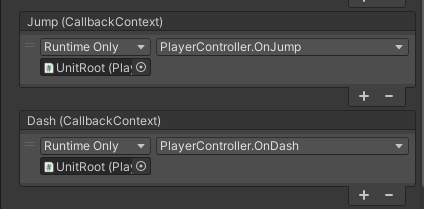
그 후 Player Input 컴포넌트에 On인 붙은 메서드들을 맞게 넣어줍니다.
점프 구현
1
2
3
4
5
6
7
8
9
    public void OnJump(InputAction.CallbackContext context)
    {
        if (context.performed && player.JumpCount > 0)
        {

            player.playerBody2D.velocity = new Vector2(player.playerBody2D.velocity.x, player.JumpForce);
            player.DownJumpLimit();
        }
    }
OnJump(InputAction.CallbackContext context)에서는 if (context.performed && player.JumpCount > 0)를 사용하여 점프 카운트가 0이상이면서 입력된 키가 이벤트 키와 맞을 때 작동합니다.
만약에 맞다면 플레이어의 Y축 방향에 작용하는 힘을 JumpForce만큼 늘려줍니다.
1
2
3
4
public void DownJumpLimit()
    {
        jumpCount--;
    }
이로인해 플레이어는 위로 올라갑니다. 그 후 player.DownJumpLimit();로 Player.cs에서 DownJumpLimit()을 불러줍니다.
그러면 Player.cs에서 DownJumpLimit()가 jumpCount--;로 점프카운트를 하나 줄여줍니다.
하지만 이러면 jumpCount가 0이 될때는 다시 점프를 못하게 됩니다.
이 해결은 다음 포스팅에서 다루겠습니다.
대쉬 구현
이게 정말 어려웠습니다.
대쉬는 2번이 가능하게 했으며 2번 다 사용시 일정 쿨타임을 주었습니다. 또한 1번 대쉬 후에 일정 시간이 지나도 쿨타임이 돌게 했어야 했습니다.
1
2
3
4
5
6
7
8
9
public void OnDash(InputAction.CallbackContext context)
{
    if (context.performed && !isDash && player.DashCount > 0)
    {
        isDash = true;
        Invoke("OffDash", player.DashTime);
        player.DownDashLimit();
    }
}
OnDash메서드에서는 키입력을 받으며 입력을 받으면 bool타입 isDash가 true가 됩니다.
1
2
3
4
void OffDash()
{
    isDash = false;
}
그 후에는 Invoke("OffDash", player.DashTime); 플레이어가 설정한 시간만큼 지속 후 OffDash메서드 호출로 isDash를 비활성화해 해줍니다.
1
2
3
4
5
6
7
8
9
10
11
12
protected void Move()
{
    direction.Normalize(); // 정규화
    if (isDash)
    {
        Dash();
        return;
    }
    player.playerBody2D.gravityScale = 3;
    transform.localScale = new Vector2(direction.x !=0 ? -direction.x : transform.localScale.x, 1);
    player.playerBody2D.velocity = new Vector2(direction.x * player.MoveSpeed, player.playerBody2D.velocity.y);
}
일단 대쉬는 Move메서드에서 작동합니다. 일정 키를 누르면 Dash메서드가 나오고 해당 대쉬 메서드는 플레이어의 이동속도를 일정시간 동안 매우 빠르게 해줍니다.
isDash가 활성화가 되면 ` if (isDash) {Dash(); return;} Move메서드 안에 있는 Dash메서드만 활성화 되고 바로 return`됩니다.
그렇게 대쉬중에는 방향전환이 안되도록 막아놓았습니다.
1
2
3
4
5
6
public void DownDashLimit()
{
    dashCount--;
    if (dashCount != 0) Invoke("DashLimitZero", 0.5f);
    if(dashCount == 0) Invoke("ResetDashLimit", 2.0f);
}
그 후에는 Player.cs에서 DownDashLimit()를 호출합니다. 여기부터 오늘의 하이라이트 입니다.
아무리 해도 dashCount를 다시 원상복귀하기가 쉽지 않았습니다.
dashCount가 0일때 작동하게하면 되겠지 하면서 해보았지만 한번만 눌렀을 때는 작동이 안되었습니다.
1
2
3
4
5
6
7
8
9
10
11
12
    public void DownDashLimit()
    {
        dashCount--;
        if (dashCount != 0) Invoke("ResetDashLimit", 2.0f);
        if(dashCount == 0) Invoke("ResetDashLimit", 2.0f);
    }

    void ResetDashLimit()
    {
        dashCheck = false;
        dashCount = DashLimit;
    }
그래서 이번에는 일단 누르면 그냥 몇초있다가 리셋하자 하면서 위의 코드를 해보았습니다.
1번 대쉬후 2초후에 다시 대쉬카운트가 초기화 되었습니다.
하지만 이렇게 되면 2번 대쉬를 하면 초기화가 2번일어나서 타이밍을 잘 맞추면 4연속 대쉬가 되었습니다.
그래서 메서드를 하나 더넣고 더 꼬았습니다.
1
2
3
4
5
6
7
 public void DownDashLimit()
 {
     dashCount--;
     if (dashCount != 0) Invoke("DashLimitZero", 0.5f);
     if(dashCount == 0) Invoke("ResetDashLimit", 2.0f);
 }
한번 눌렀을 때는 일단 대쉬카운트를 하나 뺍니다. 만약 대쉬카운트를 다 썻다면 2초후 ResetDashLimit메서드를 호출합니다. 여기까지는 같습니다.
하지만 대쉬를 다 안썻을 경우에는 다른 메서드를 거쳐갑니다.
대쉬는 한번이라도 쓰고 다 쓰지 않은 경우에는 처음 대쉬를 쓰고나서 0.5초후 하나의 메서드가 실행됩니다.
1
2
3
4
5
6
7
8
void DashLimitZero()
{
    if (dashCount != 0)
    {
        dashCount = 0;
        Invoke("ResetDashLimit", 1.5f);
    }
}
DashLimitZero에서는 대쉬가 0이 아닐때 dashCount를 0으로 만들고 1.5초뒤에 ResetDashLimit를 호출합니다.
이렇게 되면 대쉬를 다 쓰던 한번만 쓰던 결국 2초후 대쉬가 초기화가 되는 결과가 나옵니다.
오늘의 정리
오늘은 점프와 대쉬를 구현해보았다. 점프는 생각보다 많이 일찍 끝난 구현이였다.
하지만 대쉬를 만들면서 정말 어려웠다는걸 알았다.
내 생각보다 처리해야할게 많았기 때문이다.
내 생각을 정확하고 명확하게 제시를 해줘야 컴퓨터가 실행을 해주었기 때문이다.
그래서 오늘은 내가 당연하다고 생각하는 것을 컴퓨터는 정확하게 지시를 해줘야 한다는 걸 깨달았다.
그래서 코드를 짜기전 내가 원하는 동작이나 행동을 보다 명확하고 정확하게 정리를 하는 습관을 먼저 들여야한다고 생각했다.
아무리 좋은 아이디어와 구성요소를 생각으로 가지고 있다 한들 그것을 정확하게 설명하지 못하고 구현하지 못한다면 그것은 아이디어가 아닌 그냥 하나의 생각으로 남을 테니까 말이다.